








Online Audio Reverser Tool
Reverse audio online. Open a file, trim the range if needed, turn on reverse export, and save the backward version directly in your browser.
Inverter áudio Área de trabalho
Processamento de áudioArraste um arquivo de áudio aqui ou procurar
Suporta os principais formatos de áudio diretamente no seu navegador
Why Use It
Why This Audio Reverser Workflow Fits Quick Backward Exports
A focused browser workflow for people who want reverse audio without moving into a heavier desktop editor.
Reverse Export in the Same Editor
Upload one file, keep the full range or trim a section, then turn on reverse export from the same workspace.
Keep Trim and Format Controls Together
Select the exact range you want, choose the output format, and export the backward version in one pass.
Useful for Effects and Sound Design
A practical fit for transition sounds, reverse cues, stylized intros, and quick creative edits.
Create reverse transition sounds
Export a reversed section for risers, swells, and other transition effects.
Flip a short clip quickly
Take one selected phrase or audio hit and save a backward version without a full DAW workflow.
Reuse the same trim workflow
Keep the familiar editor, but use the reverse export toggle when the final file needs to play backward.
Three-step workflow
How to Reverse Audio Online
Export backward audio in three simple steps.
Step 1
Upload Audio
Choose an audio file such as MP3, WAV, M4A, AAC, FLAC, OGG, or WMA.
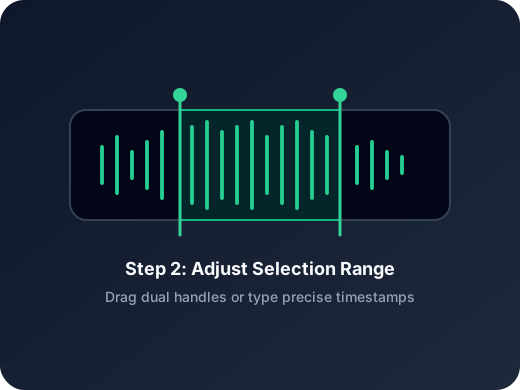
Step 2
Open Reverse Export
Adjust the range if needed, then turn on the reverse export control in the editor.
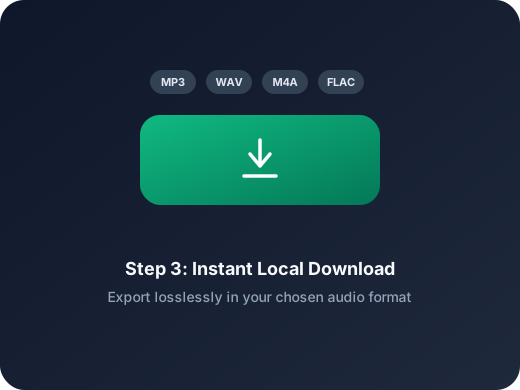
Step 3
Save the Backward Version
Export the reversed audio directly from the browser in the format you want.
Mais ferramentas
Explore mais ferramentas de áudio
Extraia, mescle ou continue aparando com a ferramenta certa.
Cortador de MP3
Corte áudio online rapidamente antes de mesclar ou juntar arquivos.
Extrair áudio
Extraia áudio de vídeo e depois mescle ou edite conforme necessário.
Compressor de áudio
Compacte MP3, WAV, M4A, AAC, FLAC, OGG e outros arquivos de áudio em formatos mais leves com predefinições de qualidade.
Alterador de velocidade de áudio
Ajuste o ritmo do áudio antes de mesclar faixas.
Fade in e fade out de áudio
Aplique fade in e fade out para suavizar começos, finais e transições bruscas antes de exportar.
Conversor de áudio
Converta formatos antes ou depois de juntar áudios.
Unir Áudios Online
Combine várias faixas em um único arquivo de forma simples. A melhor ferramenta para mesclagem de áudio sem perda de qualidade.
User Feedback
Why Users Open This Audio Reverser
A lightweight workflow for people who mainly need reverse output without extra production setup.
4.9/5
Creators, editors, teachers, and sound designers use it for quick reverse exports before delivery.
Fast setup
Open one file, enable reverse export, and save without extra steps.
Simple range control
Useful when only one selected section needs to be exported backward.
Mia Carter
Podcast ProducerHelpful when I need a short reversed cue for transitions and do not want to open a heavier editor.
Lucas Kim
Music TeacherI can flip a short example backward for lessons in just a couple of minutes.
Nina Patel
Content EditorThe reverse export toggle is straightforward. I trim the range, switch it on, and save.
Ethan Brooks
FreelancerUseful for quick sound design tasks when a client wants a reversed sting or intro.
Ready to Reverse Audio?
Upload a file, enable reverse export in the editor, and save the backward version right in your browser.
Trim the exact range first if you only need one section to be exported backward.
Support
Audio Reverser FAQ
Common questions about exporting reversed audio online.
What these answers cover
These answers explain how reverse export works, what files are supported, and how to save the backward result.
What does audio reverse do?
It exports the selected audio so the final file plays backward from end to start.
Can I reverse only part of the file?
Yes. You can trim the range in the editor first, then export only that selected section in reverse.
Does reverse change playback in the editor?
No. In this workflow, reverse only affects the exported file and does not change the live preview direction.
Which files can I open here?
You can upload common audio files such as MP3, WAV, M4A, AAC, FLAC, OGG, and WMA.
Do I need to install software?
No. The reverse export workflow runs directly in your browser.
Can I use this on mobile?
Yes. The page and editor are designed to work on modern desktop and mobile browsers.